
You have a digital product - an eBook, a template pack, a set of presets, a PDF guide - and you want to sell it where your audience already hangs out: social media.
Nice. But here’s where most creators get stuck: social media platforms don’t let you sell files directly. Instagram won’t host your ZIP. TikTok won’t process a payment. LinkedIn won’t deliver a PDF after a purchase.
So how do you actually close the sale?
The Real Problem: Bridging Social Media and File Download
Social media is a discovery engine, not a storefront. Your followers see your content, they want what you’re offering, but then what? You need something that connects that moment of interest to a completed purchase and an instant download.
That “something” needs to do three things:
- Accept payment securely, right when the buyer is ready.
- Deliver the file automatically, without you lifting a finger.
- Work with a link, because a link is all social media gives you.
Let’s look at your options.

Option 1: The Manual DM Approach
Some creators just say “DM me to buy” and handle everything manually: PayPal request, Google Drive link, back and forth.
This works when you’re making one or two sales a week. It falls apart fast. You can’t scale manual delivery, you can’t sell while you sleep, and a public Google Drive link can be shared by anyone. You also look less professional than you are.
Option 2: Full E-Commerce Platforms (Shopify, WooCommerce)
These are built for online stores with catalogs, shopping carts, and product pages. If you’re selling 100+ products with variants and inventory, they make sense.
For a creator selling selling several digital files from an Instagram bio? It’s overkill. You’ll spend hours setting up a store nobody asked for, pay monthly fees whether you sell or not, and still need plugins or apps just to handle digital file delivery.
Option 3: Creator Marketplaces (Gumroad, Sellfy, Payhip)
Platforms like Gumroad are popular and handle both payment and download. They give you a product page and a checkout.
The trade-off: fees can be steep. Gumroad takes a flat 10% on every sale (plus the transactions fees), on top of payment processing. Some of these platforms also try to absorb your customers into their own ecosystem, which means your buyer might end up browsing competitors’ products right after purchasing yours.
They also come with a learning curve and features you likely don’t need. If you just want to sell a file, it’s a lot of noise.
Option 4: Stan Store and Link-in-Bio Tools
These are designed for social media creators. You get a bio link page that doubles as a mini-storefront.
They work well for the social-first workflow. But they often charge a monthly subscription ($29/month for Stan Store, for example), and you pay that whether you sell anything or not. For creators just getting started or testing a product, that’s a real commitment.
Option 5: Stripe Payment Links + DIY
Stripe lets you create payment links with low transaction fees. The payment side is excellent.
The problem: Stripe doesn’t deliver files. After checkout, you need to figure out fulfillment yourself — redirect to a hidden page, set up webhooks, or wire together Zapier automations. It works, but it’s a project, not a solution.
Option 6 (The Simpler Path): Free Payment Links That Handle Everything
This is where tools like Paydroply come in, and why it’s worth a closer look if you specifically want to sell digital downloads from social media without the overhead.
Here’s the idea: you upload your file, set a price, and get a link. Drop that link in your Instagram bio, your TikTok profile, a tweet, a Facebook post, a LinkedIn article, or a DM. When someone clicks and pays, they immediately get a secure download page plus a confirmation email. Done.
No store to build. No monthly fee. No marketplace ecosystem pulling your customers away.
What makes it particularly well-suited for social media selling:
- It’s just a link. That’s the native currency of social media. One URL works everywhere: bio, stories, posts, DMs, comments.
- Zero setup friction. You can go from “I have a file” to “I have a payment link” in under five minutes. No themes, no catalog, no storefront configuration.
- Low cost. No monthly subscription. You only pay a small transaction fee when you actually make a sale (typically 2.9% + $1.30 per transaction). If you sell nothing, you pay nothing.
- Secure delivery. Downloads are session-bound: the link only works for the buyer who paid. It’s not a public Google Drive URL that can be forwarded to everyone.
- Buyer-friendly. Customers don’t need to create an account. They pay, they download. If they lose the file, they get an email with access and can re-download from a dedicated page.
It uses Stripe Connect under the hood, so the money goes directly to your account. You own the customer relationship entirely.
Putting It Into Practice
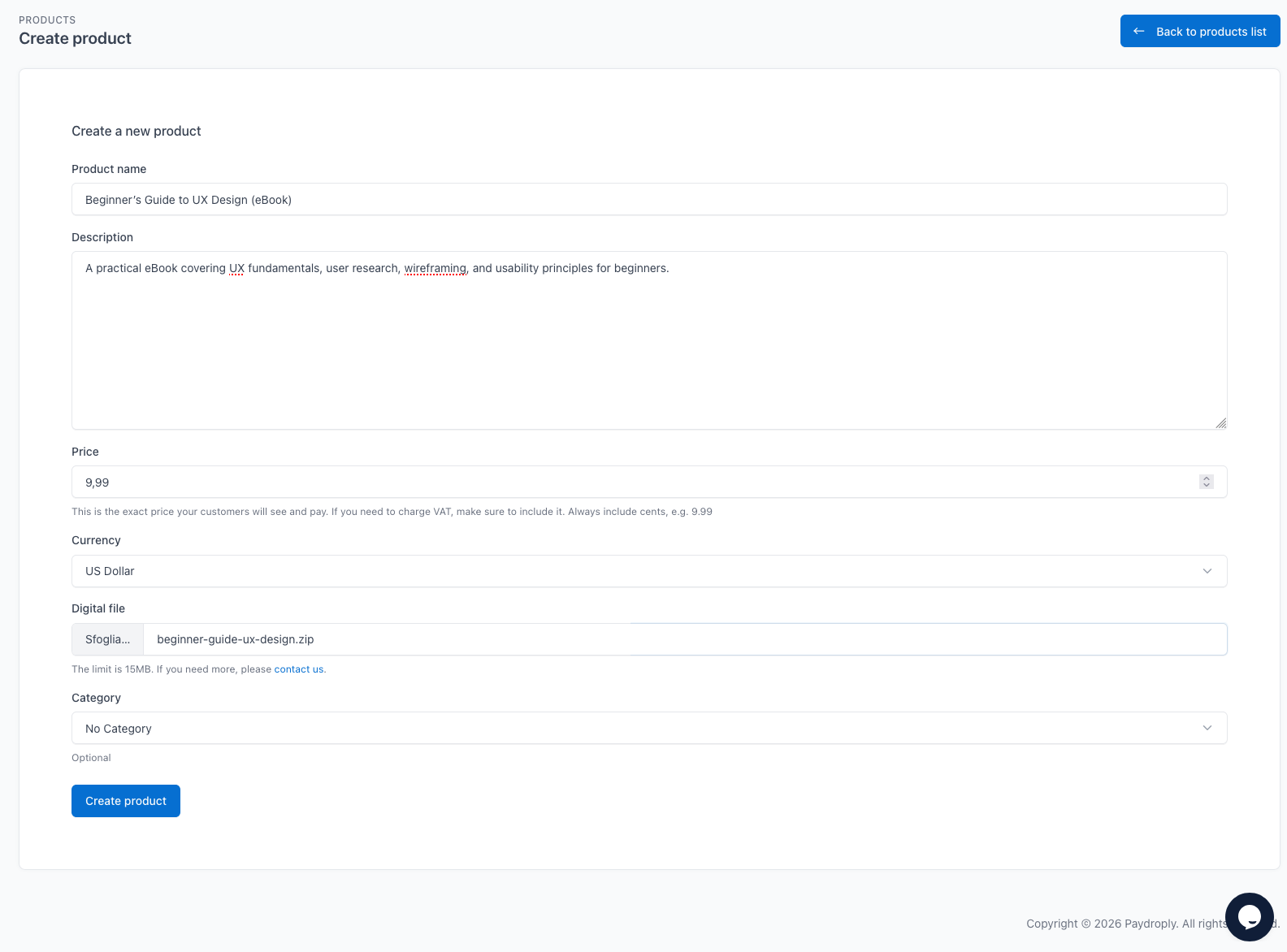
Here’s what a typical social media selling workflow looks like with Paydroply:
- Create your product. Upload your file (PDF, ZIP, image pack, whatever), set the price and currency.
- Get your link. Copy the checkout URL.
- Place it where your audience is. Add it to your Instagram bio via Linktree or directly. Pin it in your TikTok profile. Include it in your Twitter/X bio. Share it in Facebook groups. Send it in LinkedIn messages.
- Promote naturally. Post content that demonstrates the value of your product. Tease what’s inside. Show results. Then point people to the link.
That’s it. No cart abandonment to worry about, no checkout page to design, no plugin to debug.
Quick Tips for Selling Digital Downloads on Social Media
Lead with value, not the pitch. Show people what your product helps them achieve. A before/after, a quick tutorial, a behind-the-scenes look at your process. These convert better than “link in bio, go buy”.
Use the right platform for your audience. Canva templates sell well on Instagram and Pinterest. Coding resources do better on Twitter/X and LinkedIn. Presets and LUTs thrive on TikTok and YouTube. Go where your buyers already scroll.
Keep the path short. Every extra click between “I want this” and “I have this” costs you a sale. One link, one checkout, one download. That’s the ideal funnel.
The Bottom Line
You don’t need a full e-commerce store to sell digital downloads on social media. You need a link that works.
Whether you go the DIY route with Stripe, invest in a creator marketplace, or use a focused tool like Paydroply that was built specifically for this use case - the important thing is to stop overcomplicating it and start selling.
Your audience is already on social media. Your product is ready. The only missing piece is a reliable way to connect the two.
Image credits:
- cover image
- social media image