

Whether you are offering an eBook, a specialized spreadsheet, an exclusive template, or custom software, you shouldn’t have to build a complex online store just to get paid.
Dealing with shopping carts, catalog themes, and monthly fees is overkill when you simply want to sell files via link. Today, the most effective sales funnel is often the shortest one: a single, direct URL placed exactly where your audience already spends their time.
Why the “One Link” Strategy Works
Friction kills conversions. Every extra click, account creation prompt, or mandatory cart page is an opportunity for a buyer to bounce. When you share link to get paid, you eliminate the noise.
- Total Portability: Drop it in your social media bio, embed it in a WordPress post, or send it directly in a DM.
- Unmatched Speed: Your customers don’t want to register for an account. They want to pay, download, and that’s it.
- Low Overhead: No storefront means no storefront maintenance, no themes to update, and no broken plugins to fix.
The Core Challenge: How to Paywall a File Link
If you are wondering how to sell a digital file through a link, you might be tempted to just accept a payment via PayPal and manually send a Google Drive link. This could work, but it’s not really a great solution.
Public cloud storage links can be easily shared around, leading to lost revenue, and manual delivery doesn’t scale while you sleep. To safely paywall a file link, you need an automated system that handles three things flawlessly:
- Accepts payment securely.
- Automatically delivers the file instantly after checkout.
- Secures the download so only the paying customer gets access.
Top Methods to Create a Payment Link for a File

Depending on your technical expertise and budget, there are a few viable paths to set up your digital file sales.
1. Direct Payment Processors with automation tools (e.g., Stripe/Paypal + Zapier)
You can generate a direct checkout link using tools like Stripe Payment Links.
- The Good: Unbeatable transaction fees and deep customization.
- The Catch: Stripe doesn’t host or deliver your digital files out-of-the-box. You have to figure out the post-checkout secure delivery yourself, usually by stringing together third-party automation tools or writing custom code.
2. All-in-One Creator Storefronts (e.g., Gumroad)
Platforms designed to host entire creator businesses are popular, but they come with heavy bloat.
- The Good: Handles both payment and file delivery. Great if you plan to build a massive, complex catalog of dozens of items.
- The Catch: Steep fees and high friction. Gumroad, for example, charges a 10% flat platform fee plus credit card processing fees on every single sale. They also try to pull your customers into their own marketplace ecosystem.
3. The Dedicated Link Tool: Paydroply
If your primary goal is to how to sell file with link instantly without building a store or surrendering 10% of your revenue, Paydroply is the no-brainer solution.
It strips away the complexities of traditional e-commerce. You don’t need a catalog, a cart, or a theme.
- Free to use: No monthly fees and no high platform taxes. You only pay a small commission on sales (typically 2.9% + $1.30).
- Zero learning curve: If you can upload a file, you can start selling immediately.
- Secure Paywall: It uses Stripe Connect under the hood, for enterprise-grade payment security, but automatically delivers a session-bound download link to your buyer, preventing unauthorized link sharing.
Step-by-Step: How to Sell File with Link Using Paydroply
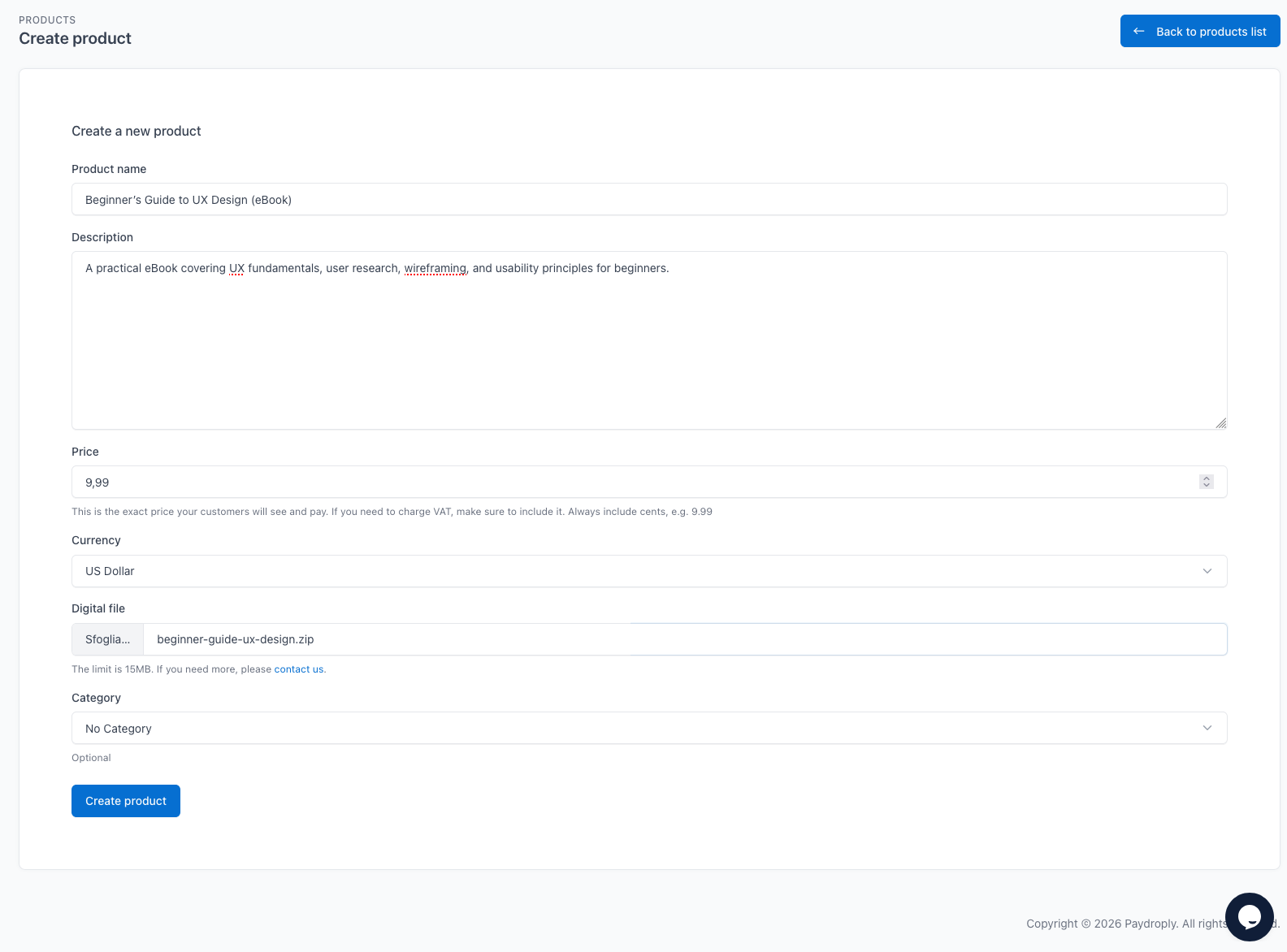
Going from an idea to getting paid takes less than five minutes:
- Create your product: Create a free account and create a new product in your dashboard.
- Set your price: Upload your PDF, ZIP, or digital asset, choose your currency and create the payment link with one click.
- Share and earn: Place the link anywhere. When a customer pays, they are immediately redirected to a secure post-checkout page to download the file and their receipt.
To create a free account on Paydroply, you can just follow a step by step procedure (start here).
The Bottom Line: Keep It Simple
In the end, your audience doesn’t care about the complex storefront you use. They just want the value your digital product provides. By choosing to sell files via link, you remove the technical barriers between your work and your customers.
Whether you piece together custom code with Stripe, absorb the platform fees of an all-in-one store like Gumroad, or use a streamlined, dedicated tool like Paydroply, the goal is the same: stop overcomplicating the process and start selling today.
Ready to make your first sale? Grab your file, generate your link, and share it with the world.